An AI personal trainer for running, the gym and recovery: you tell it how the session went, it logs it, asks for what is missing and plans next week within safe limits.
PT Pessoal ("personal trainer") is a web app installable on the iPhone (a PWA) with a coach called Luccas Amorim. Instead of filling in forms after training, you say or type how it went — "ran 8.5 km at 5:28, heavy legs" — and the coach extracts the data, asks only for what is missing, shows a summary to confirm and saves it to your history.
Around that conversation sits the rest of a serious training app: history with charts, per-exercise progress, an adaptive weekly plan, pace and heart-rate zones, races, nutrition, weight, sleep and recovery, and automatic import of Garmin activities.
Type
Personal PWA, mobile-first, in European Portuguese.
Coach
Luccas Amorim — an AI character, who says so if asked.
Sports
Running, gym, cycling, swimming and others (boxing, padel, walking…), plus nutrition and recovery.
Input
Voice (the browser's own recognition), text and photos — of the watch, a gym machine or a plate of food.
Designed to run at €0/month: Vercel Hobby, Supabase Free and Gemini's free tier.
The problem
Logging a session happens at the moment you are most tired and least willing to fill in fields.
Training apps ask for data at the worst possible moment: you have just finished a run, you are catching your breath, and the app wants distance, duration, pace, heart rate, effort, how you felt — each in its own field. The gym is worse: exercise, set, reps, load, load type, reps in reserve.
The outcome is familiar: incomplete logs, or none at all. And without a log, any plan is a guess. The bet behind this project is that the natural way to report a session is the one you would use with a real coach — saying how it went — and that turning that into structured data is the machine's job, not the person's.
Who it is for
An amateur athlete who runs and lifts, with a concrete goal (a 10 km race, a target time) and a Garmin watch. The app was built for a single user and is locked to a list of allowed emails; the data model already supports more.
(02)Luccas Amorim
The product
What follows are screens from the running app, not mockups.
The screens were captured on an emulated iPhone 15 from the real build, wired to the test doubles the project itself uses. The training data is demo data; what that implies is flagged in each caption and at the end of this section.
Home: the coach comes first
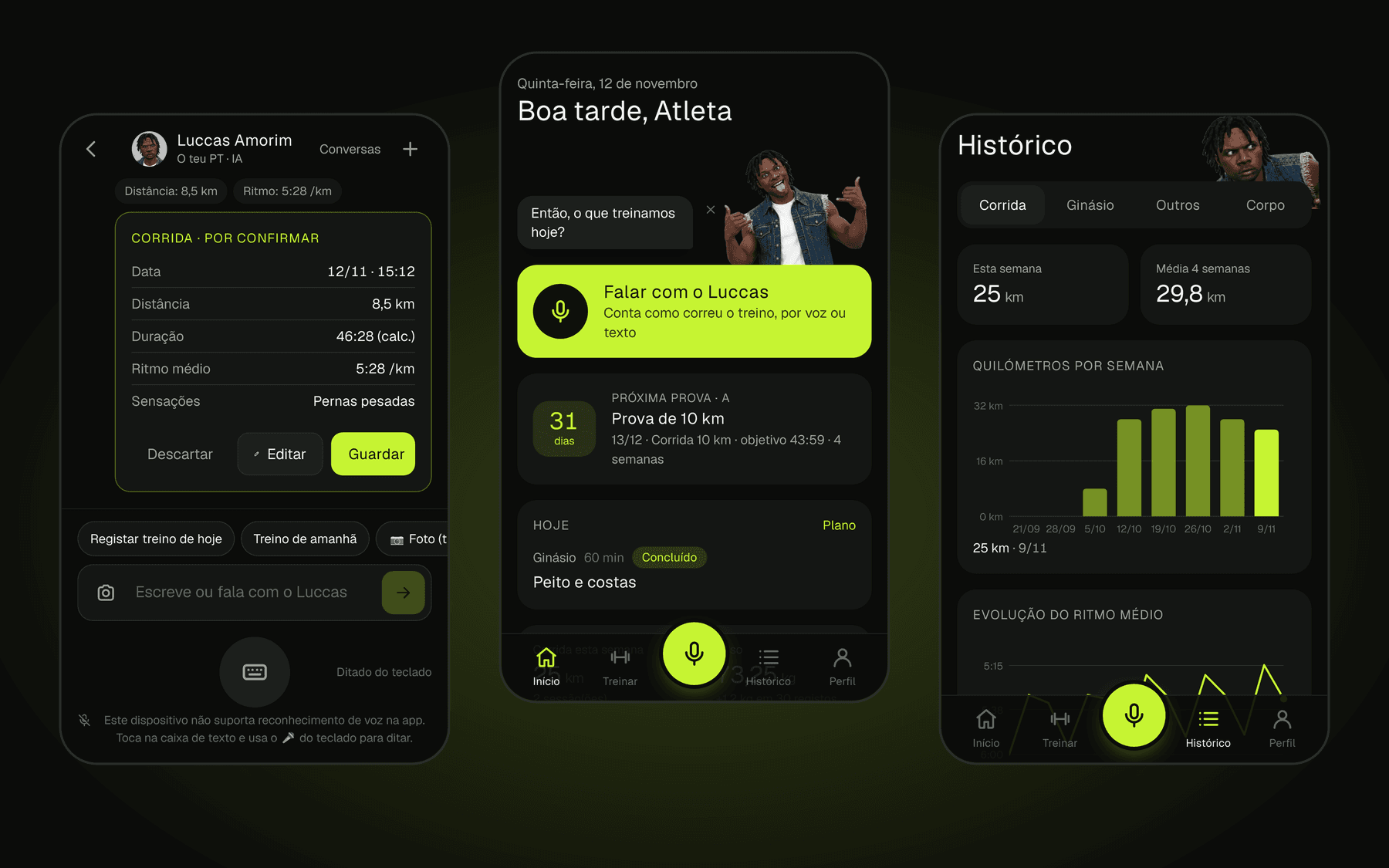
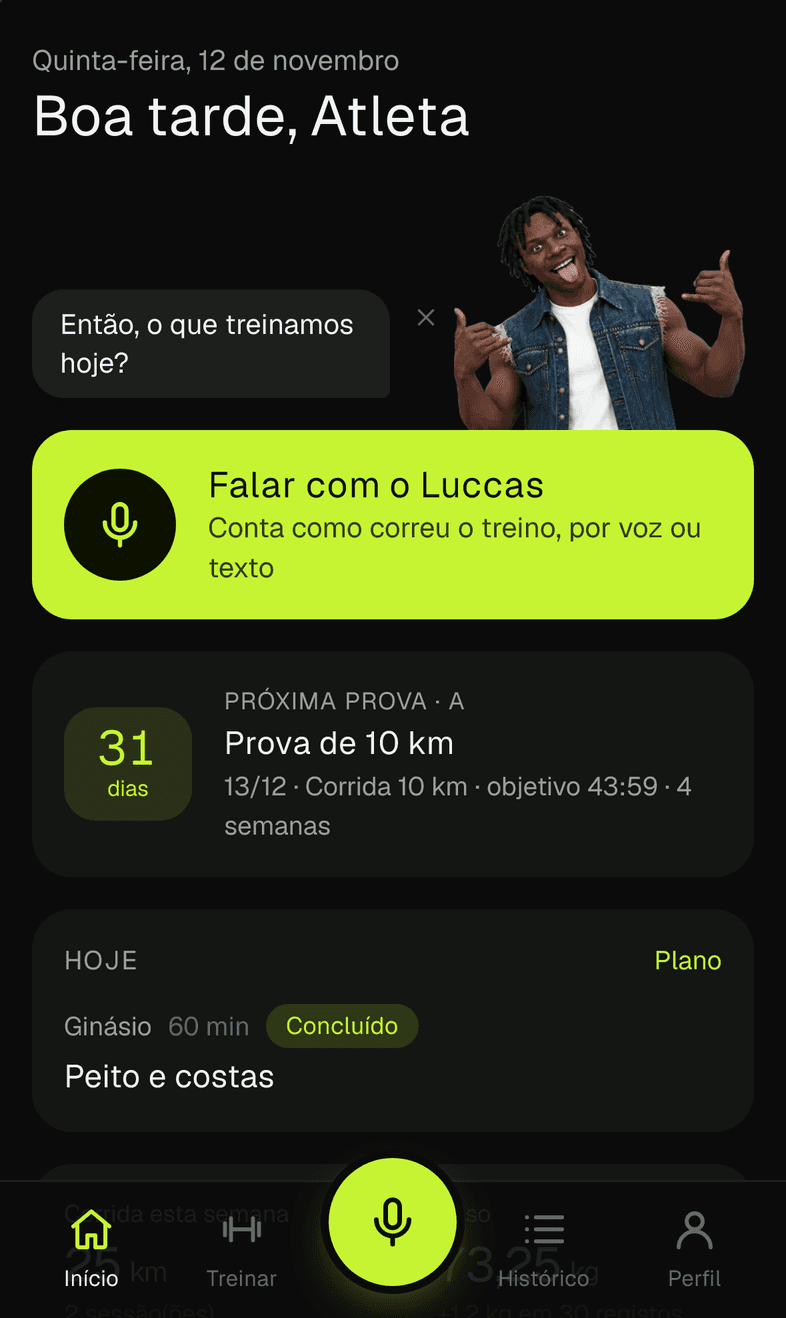
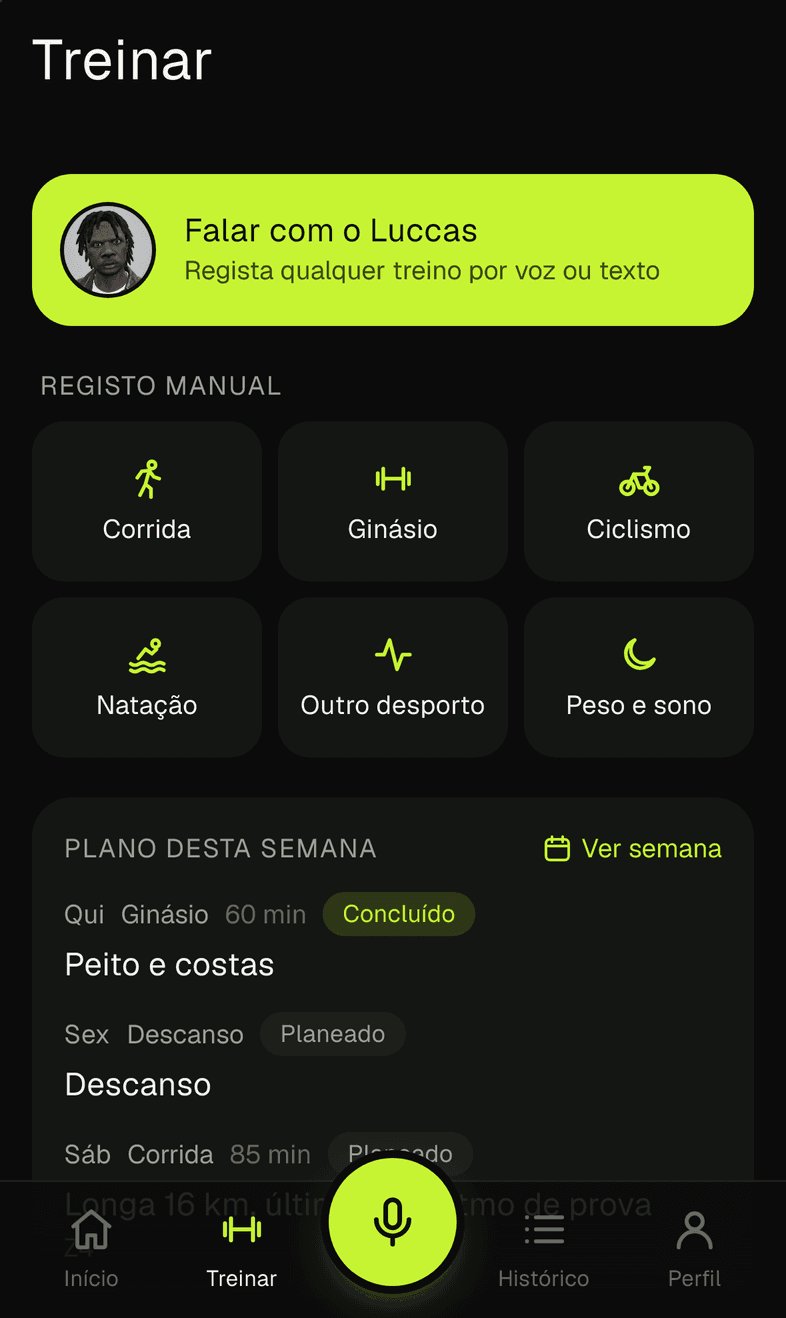
Home and Train: talking to the coach is always the first action; manual logging exists, but comes second.Demo data: "Atleta", the race and the sessions were created for these captures.
The home screen answers three questions in this order: what do I do now (talk to Luccas), where am I heading (the next race, with a countdown and target) and what is on today (the planned session). Below sit the week, recovery, today's food, training load and weight.
The microphone lives in the middle of the bottom navigation, larger than the other items. It is the app's main action and it is one tap away from every screen.
Luccas has a physical presence: a character with several poses who peeks in from the corner of the screen with a short line. It is a detail, but it changes the tone — the app stops being a spreadsheet and becomes someone you answer to.
Logging by talking
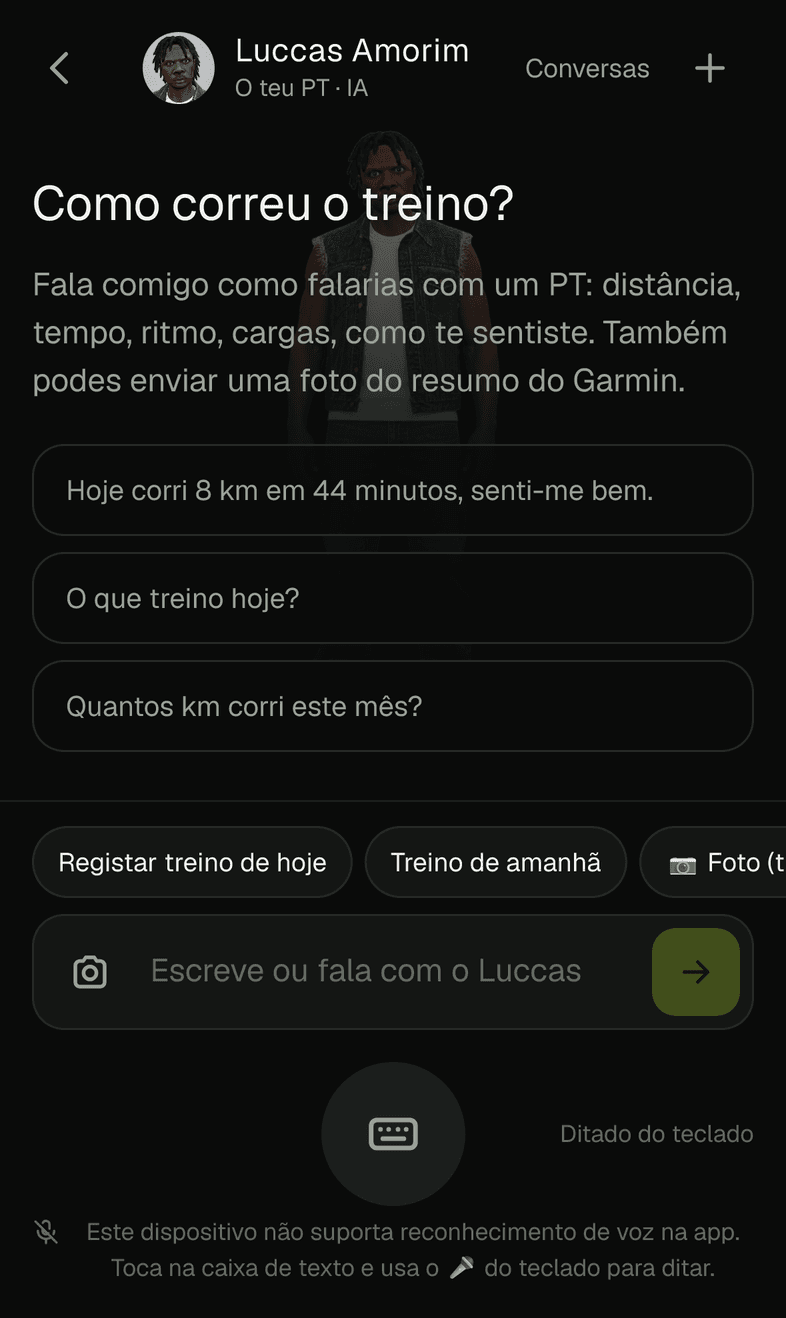
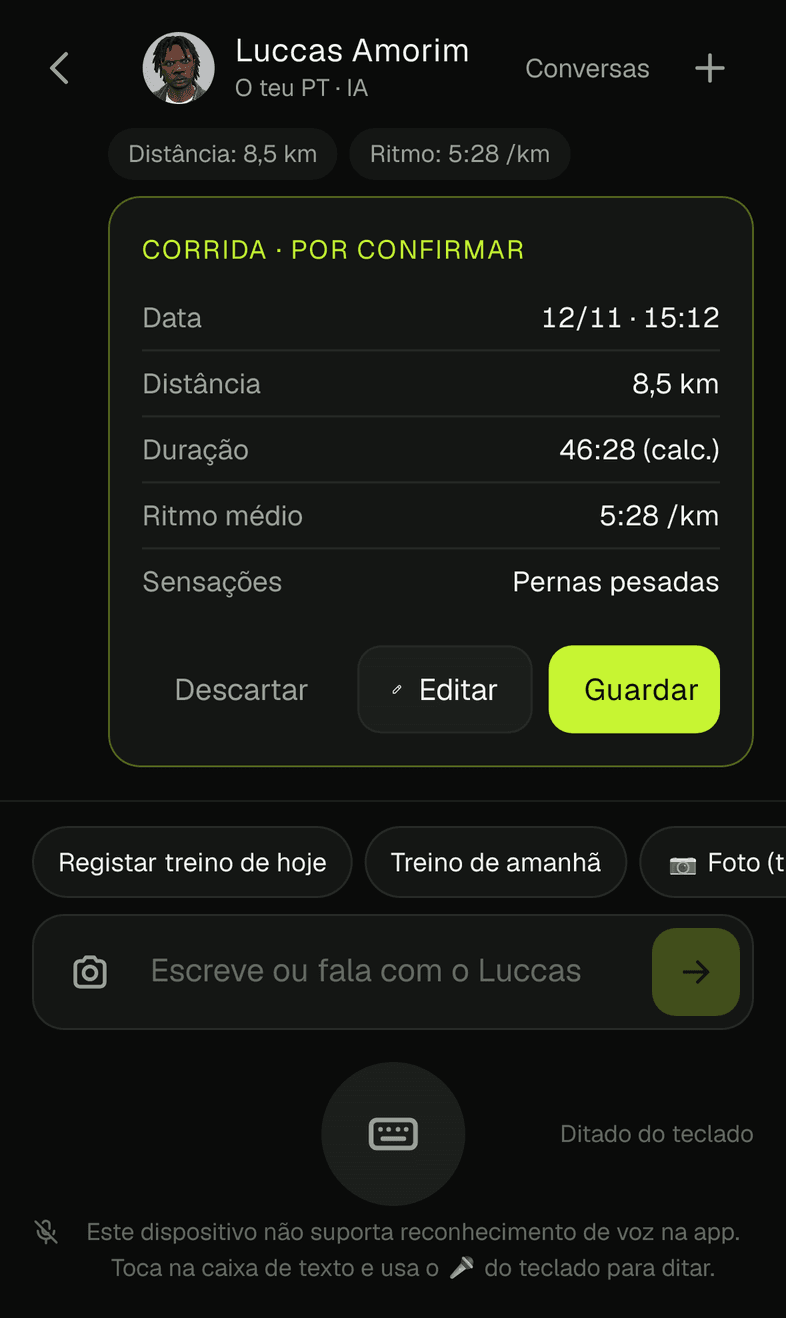
From a spoken sentence to a log: the coach recognises the data and shows an editable summary. Nothing is saved without Save.The coach's reply comes from the test double, not from Gemini. The speech-recognition notice appears because the emulated browser does not support it — it is the app's real fallback state.
The sentence "ran 8.5 km at 5:28 per kilometre, heavy legs" becomes a card with date, distance, pace, how it felt — and a duration of 46:28 marked as calculated. The AI returned the pace as it was said; the server did the maths.
The card is a proposal, not a done deal: it can be edited, discarded or saved. The "saved" message only appears once the database confirms the write. If something important is missing — effort, say — the coach asks, one thing at a time.
Beyond text, it accepts photos: a screenshot of the Garmin summary, a gym machine's display or a plate of lunch, from which it estimates calories and macros. And there is a full-screen voice conversation mode that sends when you stop talking and listens again after replying.
A weekly plan with limits
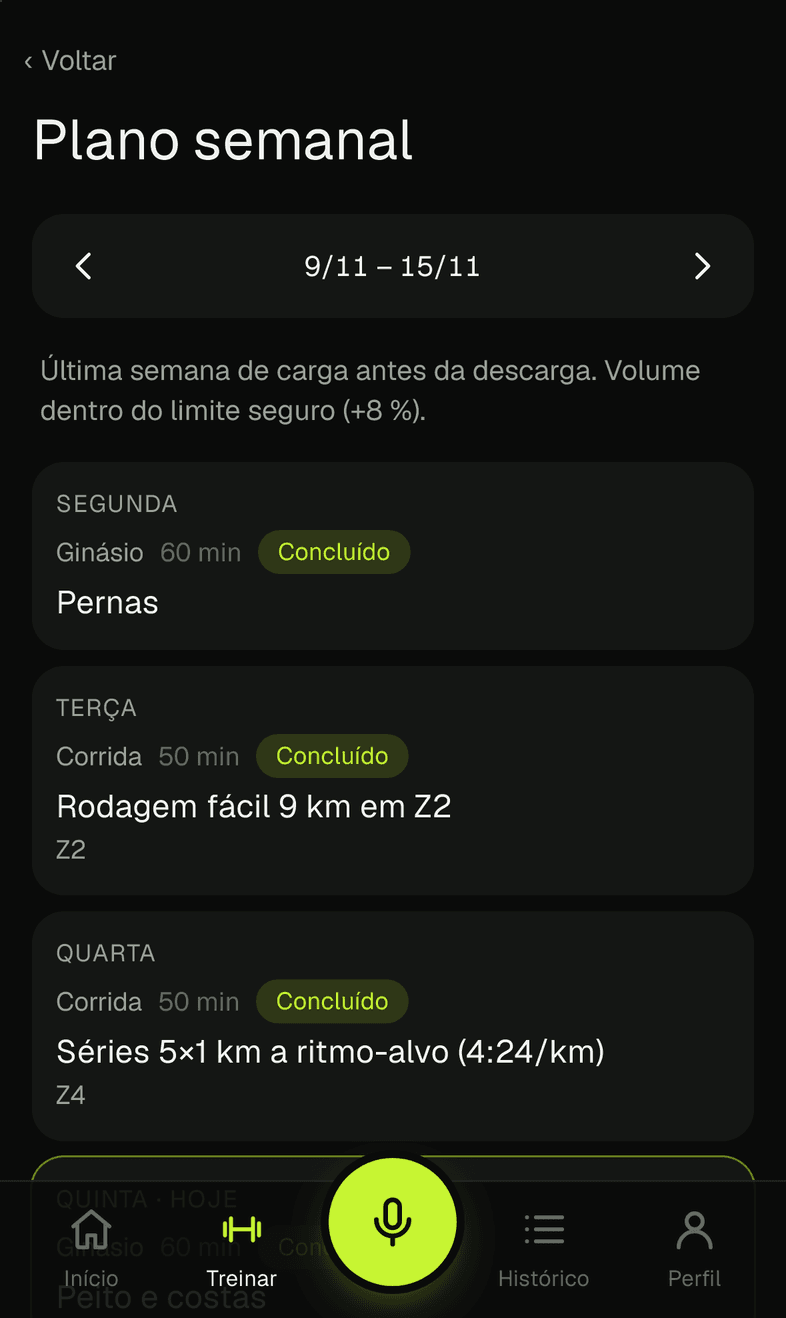
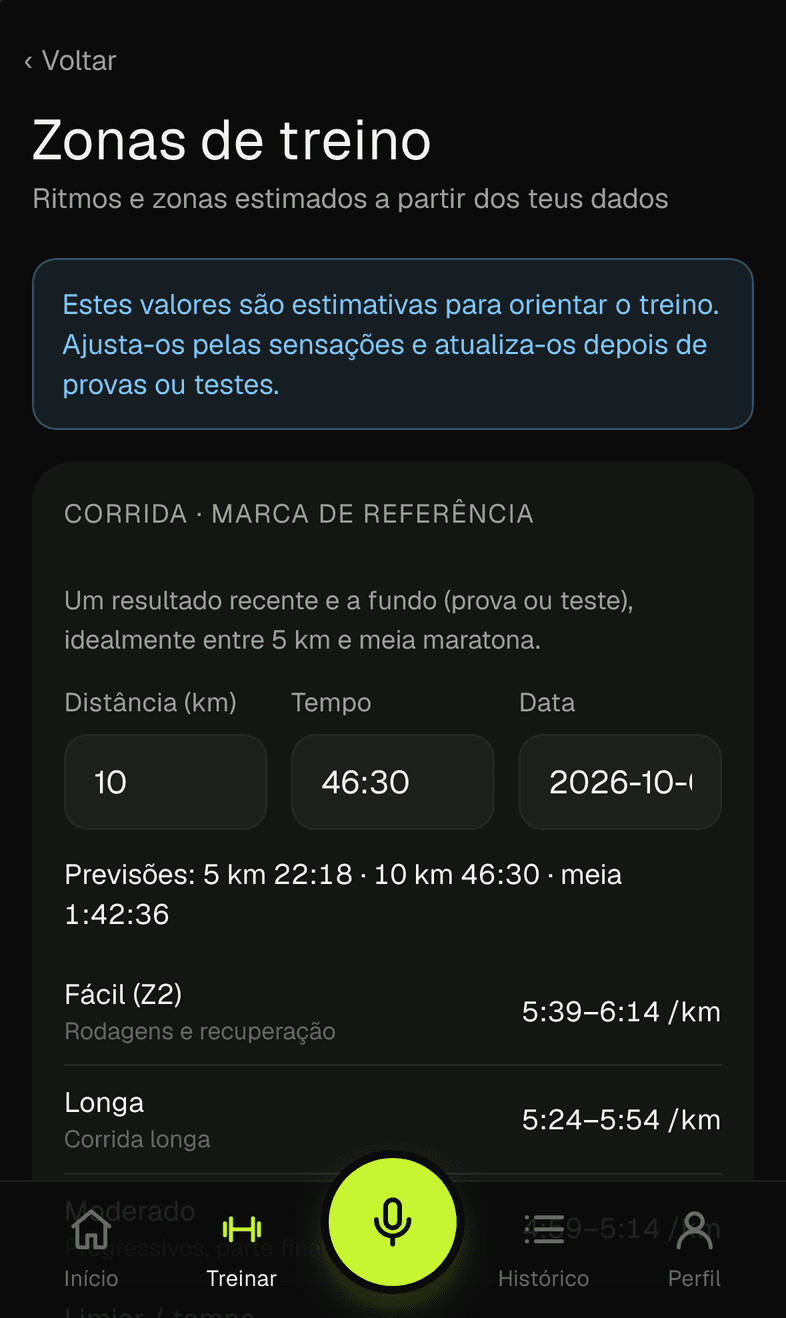
The week's plan, reconciled with what was actually done, and pace zones calculated from a reference result.Demo plan and reference result.
The coach proposes the week's plan; the app checks it before showing it. It calculates weekly kilometres, the long run and the share of quality work, and sets safe limits for the following week: roughly +10% volume, an acute:chronic ratio up to 1.3, a long run up to 40% of the total, and a deload after three rising weeks. If the proposal breaks a rule — two quality sessions on consecutive days, no rest day, a hard session the day before a race — the model is called once to fix it, and whatever still fails is shown as a warning.
The plan is always a proposal: it is only saved when you accept it. And it is reconciled with reality — if you moved Tuesday's run to Wednesday, the session shows as completed, not missed.
Zones start from a recent result (Riegel's formula for paces, Karvonen or % of max HR for heart rate, CSS for swimming, FTP for cycling) and are always presented as estimates.
History and progress
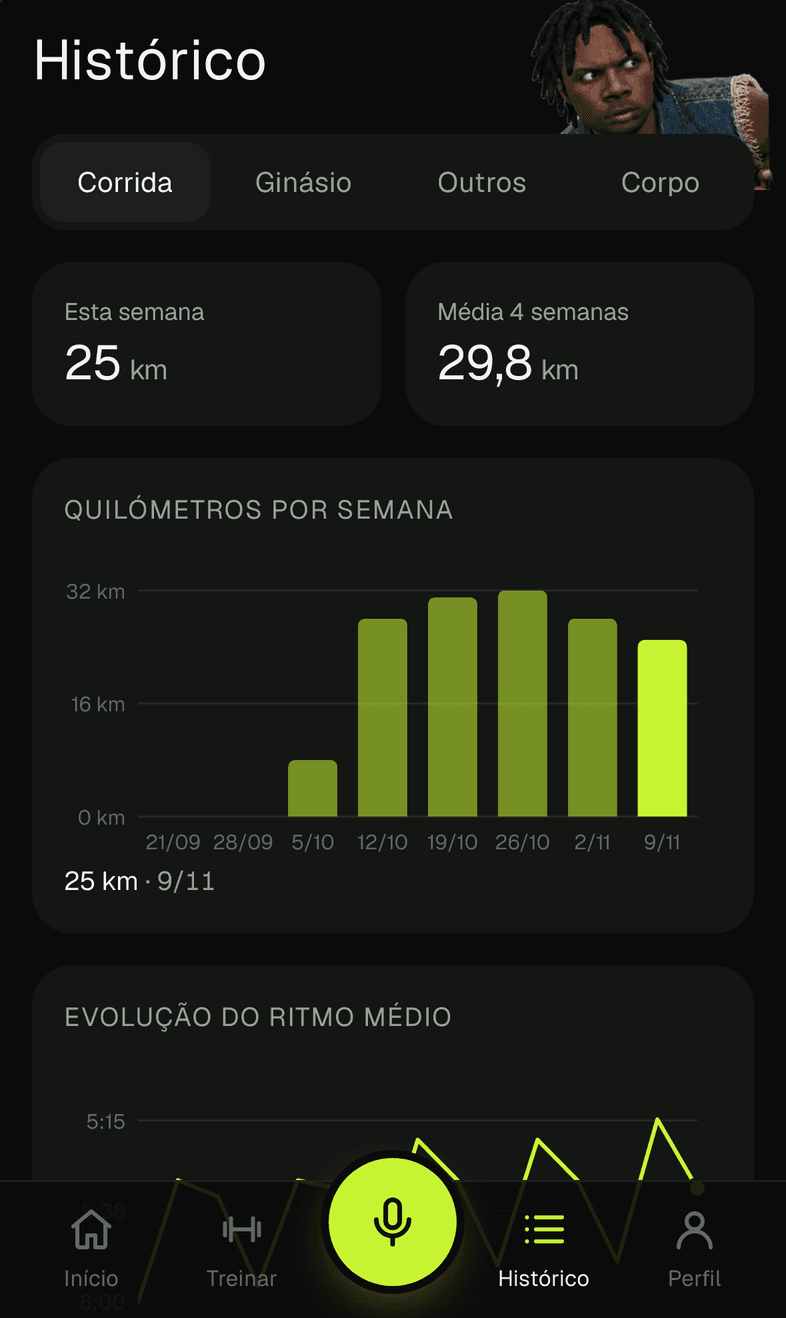
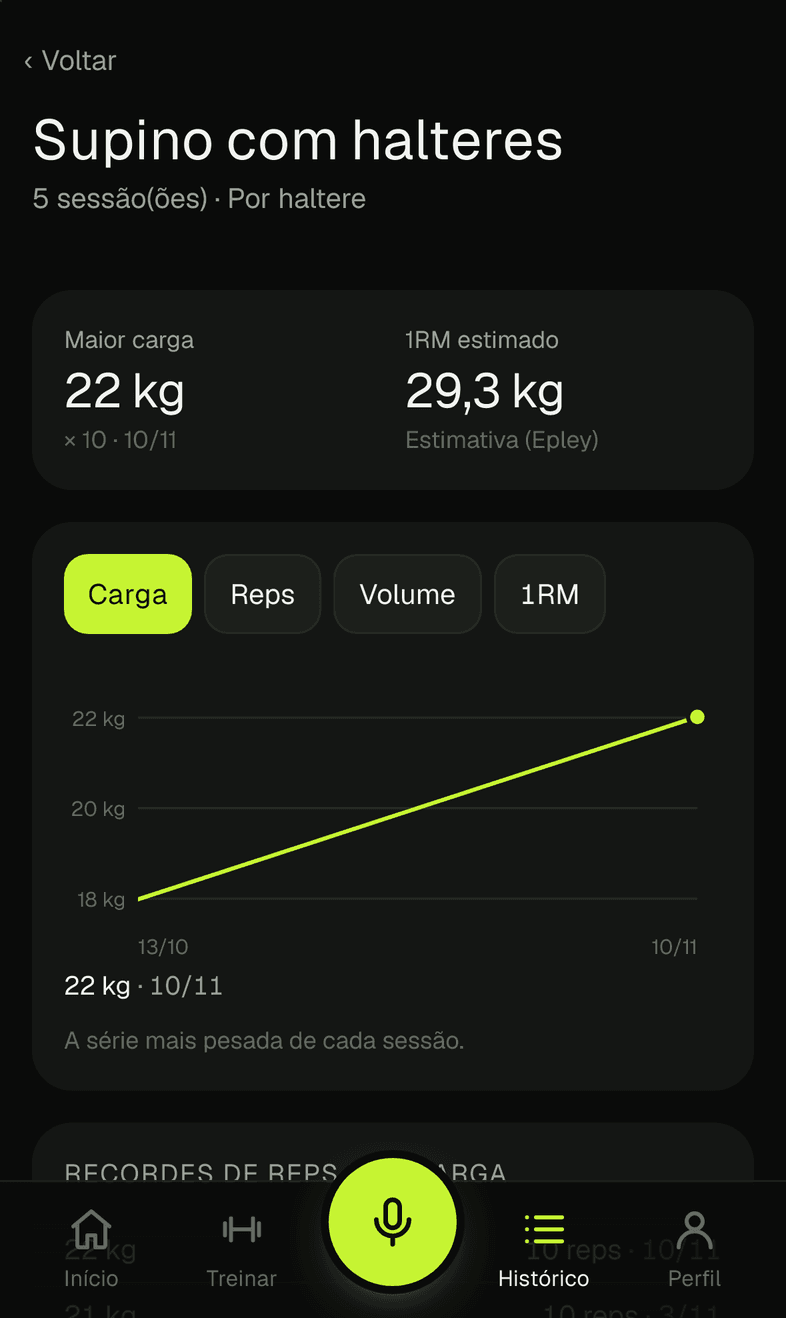
Running volume per week, and the progress of each gym exercise — load, reps, volume and estimated 1RM.Demo sessions and loads.
The charts are hand-drawn SVG, with no library. The current week stands out in bright green; earlier weeks sit in a darker shade of the same green, so the comparison is immediate without a legend.
In the gym, each exercise has its own page: heaviest load, estimated 1RM (Epley, labelled as an estimate) and rep records per load. That is what lets the coach suggest progression — and lets the athlete see it happening.
Nutrition and the weekly review
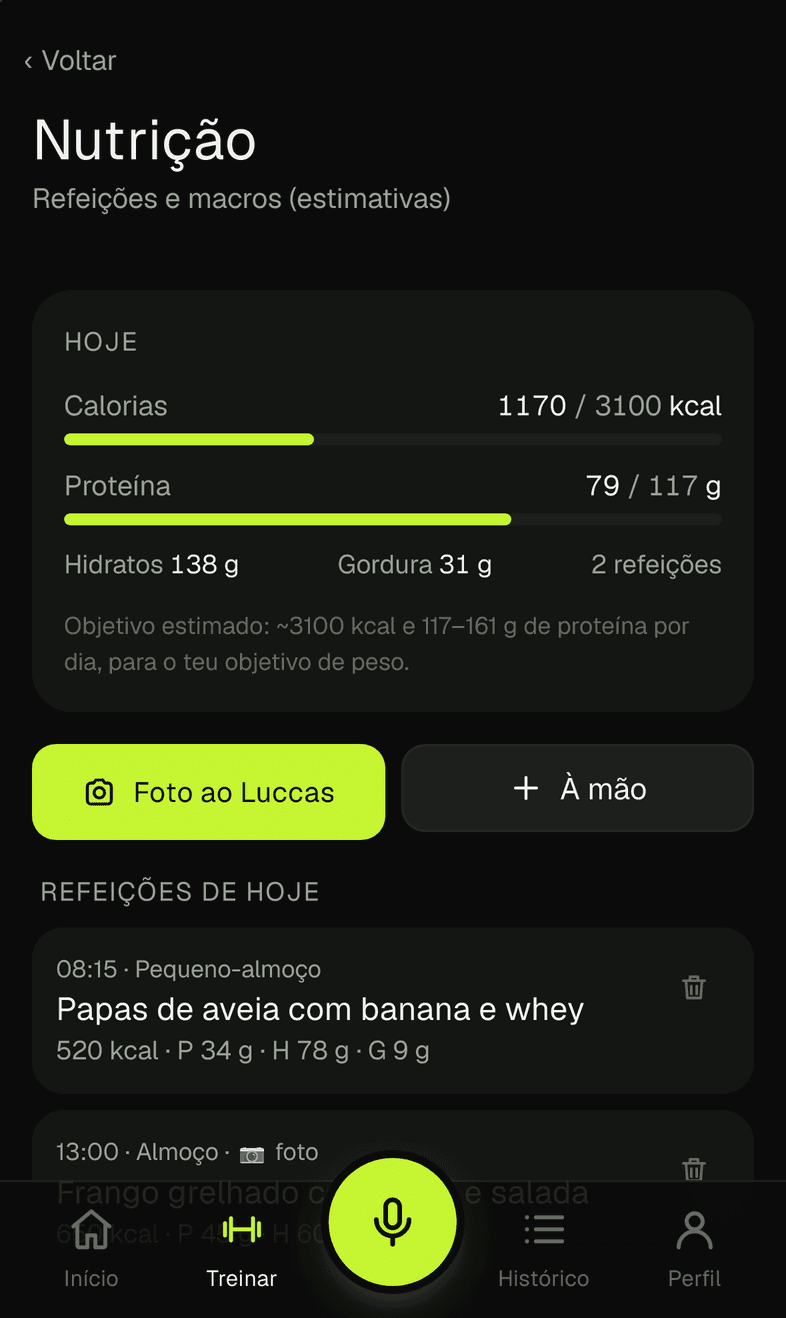
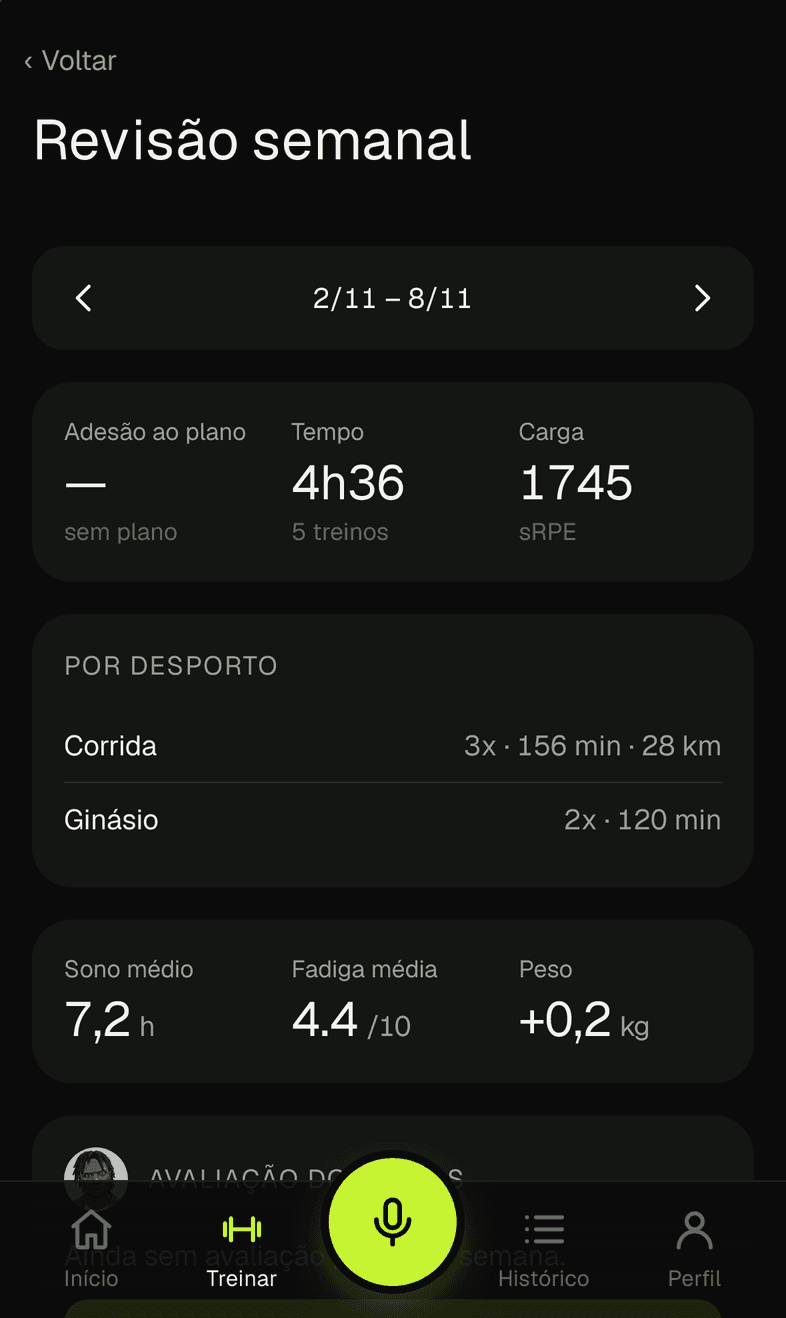
Today's food against the target, and the weekly review: time, load, volume per sport, sleep, fatigue and weight.Demo meals and logs. The review shows a week with no plan attached in the test data.
A photo of the plate is enough for the coach to estimate calories, protein, carbs and fat in an editable card. Daily targets come from the weight goal in the profile. Everything that is estimated says it is an estimate.
(03)Luccas Amorim
Design decisions
The decisions that define the product are almost all about where the AI's job ends and the app's begins.
01
The AI never does the maths
Problem
Language models get arithmetic wrong with confidence. A badly multiplied pace becomes a wrong duration in the history, and from there a wrong plan.
Decision
The model returns values exactly as they were said ("5:28", "46:30"). Missing paces, durations and distances are calculated on the server, and the card marks them as calc.
Why
It separates what the model is good at (understanding language) from what it is bad at (arithmetic), and makes what was inferred visible.
Expected
No number in the history that the athlete did not say or that was not calculated deterministically and under test.
02
The AI never writes to the database
Problem
An assistant that saves whatever it understood, without confirmation, fills the history with silent errors — and the athlete stops trusting it.
Decision
Every model response is a proposal: an editable card. The server validates it against strict schemas and only saves after the athlete taps Save. The same goes for plans, profiles and changes to sessions.
Why
Confirmation costs one tap and hands control back to the person who has the real data. Manual forms and AI proposals go through the same write path.
Expected
A history that can be trusted, even when speech recognition or the model gets it wrong.
03
Safe limits above the model
Problem
A model planning training tends to be optimistic: more volume, more intensity, less rest. For an amateur, that is the shortest route to injury.
Decision
The app calculates the limits (weekly volume, acute:chronic ratio, long-run share, deloads, phase relative to the race) and checks every proposed plan against them. Whatever fails is fixed once by the model or shown as a warning.
Why
Safety rules are deterministic and testable; they should not depend on the model remembering them.
Expected
A demanding coach — as the athlete asked for — who never pushes beyond what the data allows.
04
It works without AI
Problem
Gemini's free tier has quotas and the service is sometimes overloaded. A logging app that stops logging when the AI fails is no use.
Decision
With no key or no response, the app drops into manual mode: logging, history, plan and profile all keep working. When the AI is overloaded it tries fallback models with their own quotas; the natural voice falls back to the iPhone's.
Why
AI is the fastest way to log, not the only one.
Expected
Visible, explained degradation — never a blank screen.
Voice on the iPhone, as it actually is
Speech recognition uses the browser's own service, at no cost. On iOS, inside the installed app, it does not always work — and the app does not pretend otherwise: it detects the lack of support, explains it in one sentence and offers the alternative that always works, keyboard dictation. Recognised text stays in the box to be corrected before sending.
For the same reason, sign-in is by email and password rather than a magic link: on iOS, a link in an email opens in Safari, not in the installed PWA.
Visual system
Black#0A0B0ABackground — a single dark theme
Lime#C6F432Main action and today's data
Surface#141614Cards
A single dark theme, designed for a phone screen at the end of a session, often outdoors or in a changing room
One accent — lime — reserved for the main action and for whatever is today's
Geist Sans and Geist Mono; cards with a 1.25rem radius
Touch targets of at least 44 px, checked in the e2e tests; in-house accessible components, no UI library
In-house SVG icons and charts, to keep the JavaScript shipped to the iPhone to a minimum
(04)Luccas Amorim
Build and quality
Designing an app that relies on an AI means testing what happens when the AI fails. The project has three layers of tests, all of them run:
Unit and data
118 tests — pace and zone maths, validation, conversation flow, plan rules, and the access policies on a real Postgres database.
End-to-end
18 tests on an emulated iPhone 15 (WebKit): denied microphone, API down, no horizontal scroll, touch targets.
Against the model
9 tests against the real Gemini API, to catch changes in the model's behaviour.
The tested scenarios cover the whole path and its failures: a full run by voice, a run without a pace, follow-up questions, correcting a misheard value, several exercises in one sentence, an invalid model response, the service being down, an unauthorised user, a denied microphone.
Private by default
Every database row belongs to one user and only they can read it (Row Level Security on every table).
AI keys live only on the server; the key with full database access is never used.
The model receives a summary of the last 14 days, the week's plan and the profile — never the full history.
Photos sent to the coach are not stored, and the logs do not include message content.
Garmin integration
Garmin's official API is only open to approved companies and Strava's has become paid. The answer was intervals.icu: the watch sends each activity there, and the app imports running, cycling, swimming and other sports — with per-km splits calculated from GPS — whenever it is opened. If the same session had already been logged by hand, the app links the two instead of duplicating, and the coach then asks about effort and how it felt.
Still to do
Validation with other athletes. The app was designed and used by one person; other users' behaviour has never been observed.
Full offline support. Today there is a notice, drafts and a queue for manual logs; history and the coach need a connection.
Instant import. Without a webhook, Garmin activities arrive when the app is used, not the moment they land.